A good resume is one of the most important documents when applying for internships, placements, and jobs. It introduces your education, skills, projects, achievements, and experience to a potential employer. A well-written resume helps recruiters understand what you can contribute and why your application deserves further consideration.
However, many students and fresh graduates struggle to prepare their first professional resume. They may have limited work experience, uncertainty about what skills to include, or difficulty explaining college projects in a professional way.
The good news is that you do not need years of work experience to create a strong resume. You need a clear structure, relevant information, honest descriptions, and examples that demonstrate your abilities. This guide explains how to write an effective resume step by step.
1. Understand What Makes a Good Resume
A resume is a concise document that presents your qualifications and relevant experience for a particular opportunity. Its purpose is to help an employer quickly understand whether your background matches the role.
A strong resume should be:
- Relevant: Focus on qualifications related to the job.
- Clear: Use simple language and understandable section headings.
- Accurate: Include only genuine skills, experience, and achievements.
- Concise: Remove unnecessary information and repeated statements.
- Well organised: Present information in a logical order.
- Easy to read: Use consistent formatting and sufficient white space.
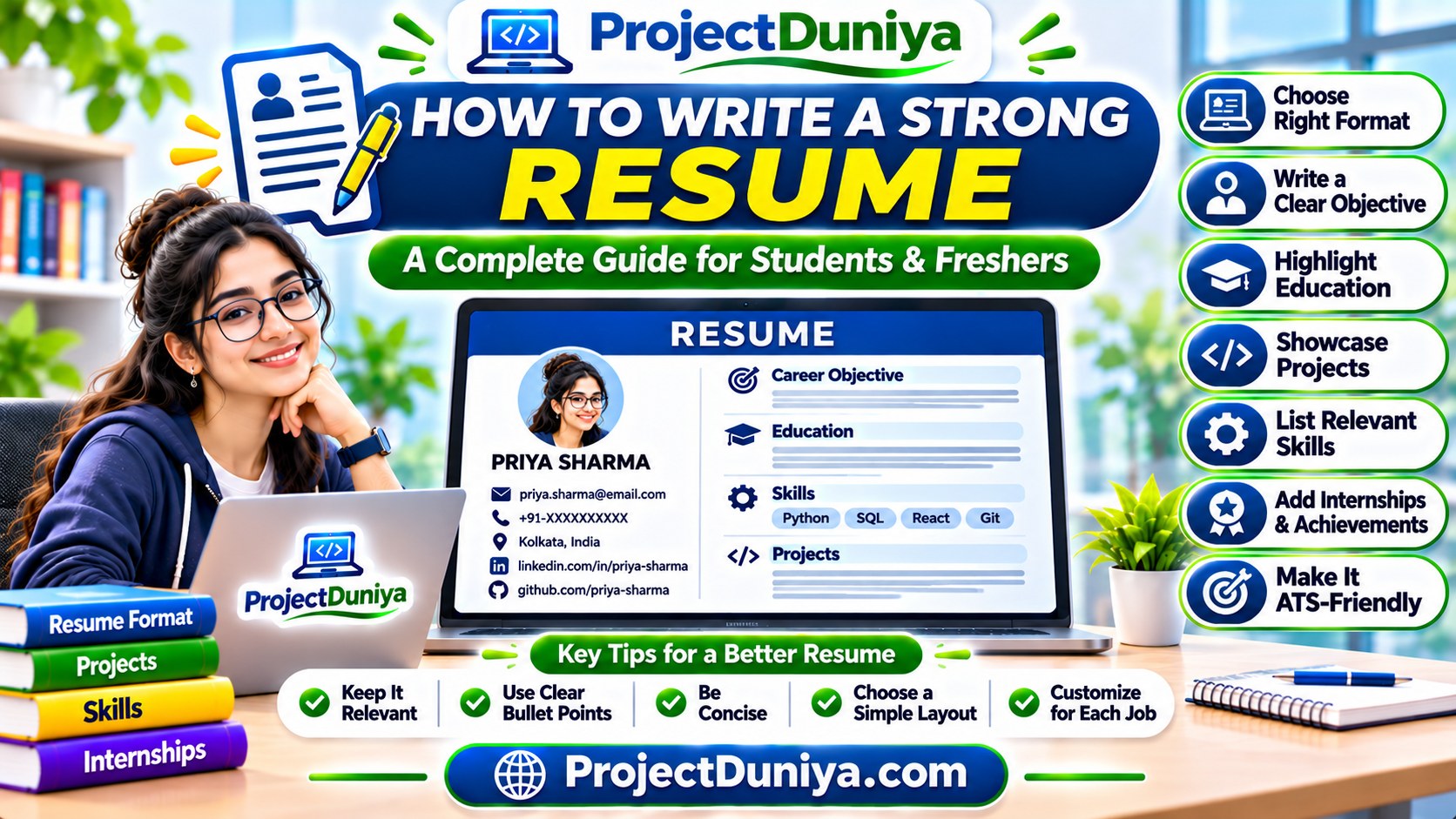
2. Choose the Right Resume Format
Before writing your resume, decide how to organise your information. Three common formats are used for different career situations.
| Resume Format | How It Works | Suitable For |
|---|---|---|
| Reverse Chronological | Shows the most recent education or experience first. | Most students, freshers, and professionals. |
| Functional | Groups information around skills and capabilities. | Some career changers or people with unusual work histories. |
| Combination | Highlights relevant skills along with education and experience. | Applicants with strong projects, internships, or transferable skills. |
For most college students and freshers, a simple reverse-chronological resume is a practical starting point. It makes education, internships, and projects easy to follow.
3. Add Your Contact Information
Your contact information should appear near the top of the resume. Recruiters should be able to identify you and contact you without searching through the document.
Include:
- Full name.
- Professional email address.
- Active mobile number with country code where appropriate.
- City and state or region.
- LinkedIn profile URL, if available.
- GitHub or portfolio link for relevant technical roles.
Avoid including unnecessary personal information such as passwords, government identification numbers, or unrelated family details. Do not add a photograph unless the employer or application instructions specifically request one.
PRIYA SHARMA
Kolkata, West Bengal, India
Email: priya.sharma@example.com
Phone: +91-XXXXXXXXXX
LinkedIn: linkedin.com/in/your-profile
GitHub: github.com/your-username
The contact details above are illustrative. Replace them with your own accurate information.
4. Write a Strong Career Objective or Professional Summary
A career objective is useful for students and freshers who are beginning their careers. It briefly explains the type of role they are seeking and the relevant skills they bring.
Keep it specific and connected to the job you are applying for. Avoid generic statements such as “I want to work in a challenging environment and improve my skills.”
Example for a software developer fresher
Computer Science graduate with practical experience in Python, SQL, and web development through academic projects. Seeking an entry-level software developer position to apply programming and problem-solving skills while contributing to software development projects.
Example for a data analyst fresher
Recent graduate with practical knowledge of Excel, SQL, and Power BI. Developed academic projects involving data cleaning, analysis, and dashboard creation. Seeking an entry-level data analyst role to support data-driven decision-making.
If you already have relevant professional experience, a professional summary that highlights your expertise and achievements may be more appropriate than a career objective.
5. Present Your Educational Qualifications
Education is especially important for students and freshers because they may not have extensive professional experience.
For each qualification, mention:
- Degree or course name.
- College, institution, or university.
- Specialisation or branch, where relevant.
- Year of completion or expected graduation.
- CGPA or percentage, if relevant or requested.
Bachelor of Computer Applications (BCA)
ABC College, Kolkata
Expected Graduation: 2027
CGPA: 8.2/10
Higher Secondary Education
XYZ Higher Secondary School
Completed: 2024
List qualifications in reverse chronological order, starting with the most recent. Do not exaggerate marks or include a qualification that you have not completed.
6. Highlight Relevant Technical and Professional Skills
Your skills section should demonstrate the abilities required for the job. Avoid adding every tool or programming language you have ever encountered. Select skills that you can genuinely use and explain.
For a technical fresher, you can organise skills into categories:
| Skill Category | Examples |
|---|---|
| Programming Languages | Python, Java, C, JavaScript |
| Web Technologies | HTML, CSS, React |
| Databases | MySQL, PostgreSQL, MongoDB |
| Tools | Git, GitHub, VS Code |
| Data Skills | Excel, SQL, Power BI |
| Professional Skills | Communication, teamwork, problem-solving |
These are examples, not a list that every candidate should copy. Choose skills based on your actual knowledge and the requirements of the position.
7. Describe Projects in a Professional Way
Projects are particularly valuable for freshers because they demonstrate how you apply your knowledge. Academic assignments, personal projects, hackathon work, and independent applications can all be relevant.
For each project, include:
- Project name.
- Short explanation of the problem or purpose.
- Technologies or tools used.
- Your individual contribution.
- Important features or outcomes.
- GitHub or live demo link, where available.
Weak project description
Made a student management project using Python.
Improved project description
Student Management System | Python, MySQL
- Developed a student record management application with registration, search, and update functionality.
- Connected the application to a MySQL database to store and retrieve student information.
- Implemented input validation to reduce incorrect data entry.
The improved version explains what the project does and which skills were applied. Only include features you actually implemented. If you have measured a genuine outcome, add the result rather than inventing a number.
8. Include Internships, Training, and Work Experience
If you have completed an internship, part-time job, freelance assignment, or relevant training programme, include it in your resume.
For each experience, mention:
- Organisation or company name.
- Your role or designation.
- Start and end dates.
- Main responsibilities.
- Important contributions or achievements.
Use action verbs such as developed, designed, analysed, tested, organised, created, implemented, and coordinated.
If you do not have professional experience, do not leave the resume looking empty. Give more space to relevant projects, academic work, volunteering, and practical training.
9. Add Certifications and Achievements
Certifications can show that you have studied a subject or completed structured training. Achievements can demonstrate initiative, participation, and performance outside regular coursework.
Examples include:
- Programming or data analysis certifications.
- Relevant NPTEL or online course certificates.
- Hackathon participation or awards.
- Academic scholarships.
- Technical competition achievements.
- Research presentations or publications.
- Leadership roles in student organisations.
Include the certificate name, issuing organisation, and completion date where useful. Do not list a course as completed if you have only enrolled in it.
10. Make Your Resume ATS-Friendly
Many employers use Applicant Tracking Systems (ATS) to collect, organise, and search job applications. Some systems compare resume content with the skills and qualifications in a job description.
There is no universal format that guarantees an ATS pass, because systems and employer settings differ. However, a simple, readable document is a sensible approach.
Practical ATS formatting tips
- Use a clean, single-column layout.
- Use standard headings such as Education, Skills, Projects, and Experience.
- Avoid complicated tables, text boxes, and decorative graphics in the main resume layout.
- Use readable fonts such as Arial or Calibri.
- Keep dates and section formatting consistent.
- Use relevant keywords from the job description naturally.
- Include both full terms and familiar abbreviations where useful.
- Keep important contact details in the main document body rather than relying on headers or footers.
11. Tailor Your Resume for Every Job Application
One generic resume may not communicate your suitability for every job. Different roles require different skills, so adjust your resume to match the position.
Follow this process:
- Read the job description carefully.
- Identify the essential skills, qualifications, and tools.
- Compare those requirements with your actual experience.
- Move the most relevant projects and skills higher in the document.
- Use appropriate terminology from the job description where it accurately describes your work.
- Review the final resume to make sure every statement is truthful.
For example, a software developer application may emphasise programming languages, Git, databases, and software projects. A data analyst application may give more attention to Excel, SQL, data cleaning, visualisation, and analytical projects.
12. Common Resume Mistakes to Avoid
| Common Mistake | Better Approach |
|---|---|
| Using the same resume for every job | Adjust relevant skills and projects for each role. |
| Adding too many unrelated skills | Prioritise skills that you can demonstrate. |
| Writing long paragraphs | Use concise bullet points. |
| Including false experience | Describe genuine academic and personal work. |
| Using decorative templates | Choose a clean, readable layout. |
| Ignoring spelling mistakes | Proofread and ask someone to review it. |
| Adding an unprofessional email | Use a simple professional email address. |
| Including unnecessary personal details | Keep information relevant to the application. |
13. What Is the Ideal Resume Length?
For many college students and freshers, one page is a useful target. It encourages you to prioritise relevant information and avoid unnecessary descriptions.
A longer resume may be appropriate when you have substantial relevant experience, research, publications, or other important qualifications. Follow the employer’s instructions if a specific length is requested.
Do not reduce the font to an uncomfortable size just to force every detail onto one page. Remove less relevant information first.
14. Final Resume Checklist
Before sending your resume, check each of the following points:
- Your name and contact details are correct.
- Your career objective or summary matches the role.
- Your education details are accurate.
- Your skills are relevant and genuine.
- Your projects explain your actual contribution.
- Your internship and work dates are correct.
- Your achievements and certificates are verifiable.
- Your layout is simple and consistent.
- Your spelling and grammar have been checked.
- Your links open correctly.
- Your document follows the employer’s requested file format.
- Your filename is professional, such as
Priya_Sharma_Resume.pdf.
Conclusion
Writing a strong resume is about presenting your real qualifications in a clear and relevant way. Students and freshers should focus on education, practical projects, technical skills, internships, and achievements instead of worrying about having limited professional experience.
Use a clean format, write specific project descriptions, select relevant keywords, and customise the document for each application. Most importantly, keep every statement honest and be prepared to explain the skills and projects you mention.
A well-prepared resume will not guarantee a job, but it can help employers understand your potential and decide whether to invite you for an interview.
Explore more student career guidance, academic resources, and resume-writing tips at ProjectDuniya.