Students often store lecture notes, textbooks, research papers, and project documentation in separate PDF files. Finding a particular definition or explanation across many documents can take considerable time. An AI-powered academic document assistant can make this process easier by allowing users to ask questions in natural language and receive answers based on the documents they upload.
This project uses Retrieval-Augmented Generation (RAG) to retrieve relevant passages from academic documents and provide them as context to an AI language model. The assistant then generates an answer and displays the source document information so students can check the original material.
1. Project Overview
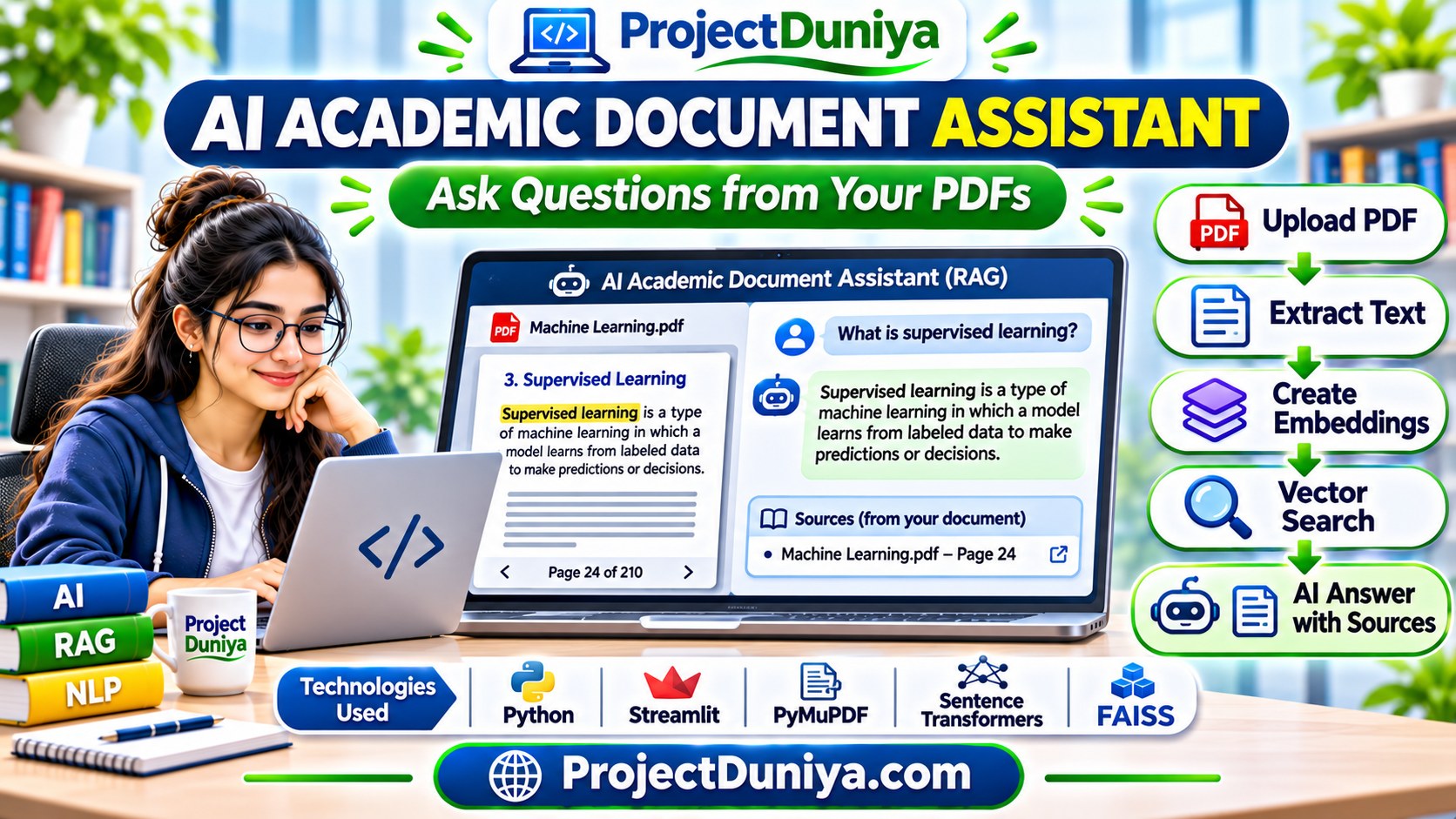
The AI Academic Document Assistant is a web application where students upload PDF notes or study materials and ask questions about their contents.
For example, after uploading a machine learning textbook chapter, a student could ask, “What is supervised learning?” The system searches the document for relevant passages and uses those passages to prepare an answer.
2. Main Project Objectives
- Allow students to upload academic PDF documents.
- Extract and process text from uploaded files.
- Divide long documents into smaller searchable sections.
- Convert text sections into numerical embeddings.
- Retrieve passages relevant to a user’s question.
- Generate answers using retrieved document content.
- Display source information for answer verification.
- Evaluate answer quality using a prepared question set.
3. Technologies Required
| Technology | Purpose |
|---|---|
| Python | Main programming language |
| Streamlit | Web application interface |
| PyMuPDF | Extract text from PDF files |
| Sentence Transformers | Generate text embeddings |
| FAISS | Search for similar document vectors |
| LLM API or local model | Generate answers from retrieved context |
| NumPy | Numerical data processing |
You can use an API-based language model or a locally hosted model, depending on your hardware, budget, and project requirements. Check the chosen model and service licence, privacy terms, and usage limits before using them.
4. How the AI Document Assistant Works
The system follows a retrieval-and-generation workflow. It does not need to train a new language model from scratch. Instead, it finds relevant content in the uploaded documents and passes that content to an existing language model.
- Document upload: The student uploads a PDF file.
- Text extraction: The application extracts readable text from the document.
- Text chunking: Long text is divided into smaller overlapping sections.
- Embedding generation: Each section is converted into a numerical vector.
- Vector indexing: The vectors are stored in a searchable index.
- Question processing: The student’s question is converted into an embedding.
- Retrieval: The system finds document sections most similar to the question.
- Answer generation: The retrieved sections are supplied to the language model as context.
- Source display: The application shows the answer with relevant document and page references where available.
Uploaded document: Introduction to Artificial Intelligence.pdf
Student question: What is machine learning?
Retrieved content: Relevant passages from the uploaded document.
Generated answer: A concise explanation based on the retrieved passages.
Source: The original PDF and the page containing the supporting passage.
5. Main Modules of the Project
Module 1: PDF Upload
Provides an interface for uploading academic PDFs. Validate file types and sizes, and handle unreadable or password-protected files with clear error messages.
Module 2: Text Extraction
Extracts text from PDF pages using a library such as PyMuPDF. Store the page number with each extracted section so the system can identify where information came from. Scanned PDFs may require an additional OCR step.
Module 3: Text Chunking
Splits extracted text into manageable sections. Overlapping chunks can help preserve context when a relevant explanation spans a boundary. Choose chunk sizes experimentally rather than assuming one setting works for every document.
Module 4: Embedding Generation
Uses a Sentence Transformer model to convert text sections and questions into vectors. These representations support semantic search, which can identify related passages even when the question uses different wording.
Module 5: Vector Search
Stores and searches document embeddings using FAISS or another vector-search solution. The system retrieves the most relevant passages for each question.
Module 6: AI Answer Generation
Combines the user’s question with retrieved passages and sends them to the selected language model. The prompt should instruct the model to answer from the supplied material and clearly say when the documents do not contain enough information.
Module 7: Source and Chat Interface
Displays the generated response, relevant source passages, document names, and page references. Students can ask follow-up questions while keeping the document context available.
6. Suggested Project Folder Structure
academic-document-assistant/├── app.py├── requirements.txt├── config.py├── modules/│ ├── pdf_reader.py│ ├── text_chunker.py│ ├── embeddings.py│ ├── vector_search.py│ └── answer_generator.py├── data/├── tests/└── README.md
This is a suggested organisation. You can modify it as the application grows. Keep API keys and other secrets outside source code, using environment variables or an appropriate secrets manager.
7. Development Steps
- Install Python and create a virtual environment.
- Install Streamlit, PyMuPDF, Sentence Transformers, FAISS, and other required packages.
- Create a basic Streamlit page with a PDF upload control.
- Extract text from each uploaded PDF and preserve page metadata.
- Split the extracted text into chunks.
- Generate embeddings for the chunks using a suitable Sentence Transformer model.
- Build a FAISS index from the embeddings.
- Convert the user’s question into an embedding and retrieve relevant chunks.
- Send the question and retrieved context to the language model.
- Display the response and supporting source information.
- Test the application with questions whose answers are both present and absent from the uploaded files.
8. Important Features to Add
- Multiple PDF uploads: Allow students to search across several related documents.
- Source citations: Show the document name and page number for retrieved information.
- Chat history: Keep a record of questions within a study session.
- Document management: Allow users to remove documents and their associated index entries.
- Multilingual questions: Explore multilingual embedding models for questions in different languages.
- Answer feedback: Let users report answers that are incomplete or unsupported.
- Downloadable notes: Allow users to save selected answers and source references.
9. Testing and Evaluation
A working interface does not automatically mean the AI system is reliable. Prepare a test set before evaluating the project.
For example, create 20 to 30 questions from your uploaded documents and record the correct supporting passages. Include questions that require a direct fact, questions that combine information from different sections, and questions that cannot be answered from the documents.
| Test Area | What to Check |
|---|---|
| PDF extraction | Whether relevant text is extracted correctly |
| Retrieval | Whether the correct passages appear in the top results |
| Answer relevance | Whether the response addresses the question |
| Source accuracy | Whether citations support the generated answer |
| Unsupported questions | Whether the assistant admits when evidence is missing |
| Response time | How long document processing and question answering take |
Report actual results from your experiments. You can measure retrieval quality using metrics such as Recall@k and evaluate answer faithfulness through human review or a carefully configured evaluation framework. Do not claim that the system is accurate simply because it produces fluent answers.
10. Advantages and Limitations
Advantages
- Makes large collections of notes easier to search.
- Supports natural-language questions.
- Can provide source references for verification.
- Combines document processing, embeddings, search, and language models.
- Can be extended to different academic subjects.
Limitations
- Poor-quality scans may require OCR and can produce extraction errors.
- Relevant information may not always appear in the retrieved passages.
- Language models can still generate incorrect or unsupported statements.
- API-based models may introduce usage costs and privacy considerations.
- Large document collections may require additional storage and indexing work.
11. Future Scope
The project can be extended with features such as lecture audio transcription, automatic flashcard generation, multilingual document search, diagram understanding, and comparison of information across multiple PDFs. These should be added only after the core retrieval and source-verification workflow works reliably.
Conclusion
The AI-Powered Academic Document Assistant is a practical project for students interested in artificial intelligence, natural language processing, and generative AI. It demonstrates how PDF extraction, text embeddings, vector search, and language models can work together to create a useful academic application.
For a strong final-year submission, focus on reliable document retrieval, accurate source references, honest handling of unanswered questions, and measurable testing. A carefully evaluated document assistant is more valuable than a chatbot that simply generates impressive-looking responses.
Explore more AI, programming, and final-year project guides at ProjectDuniya.