Taking notes is an important part of student life, but writing everything a teacher says is not always the best way to learn. Good notes help you understand important concepts, organize information, prepare for examinations, and revise topics without reading an entire textbook again.
However, different subjects require different note-taking approaches. A programming lecture may need code examples, while a history lesson may be easier to organize using timelines. Choosing the right method can make studying more organized and effective.
In this guide, you will learn seven useful note-taking methods for students, understand when to use each one, and discover how to build a simple note-taking system for college or university.
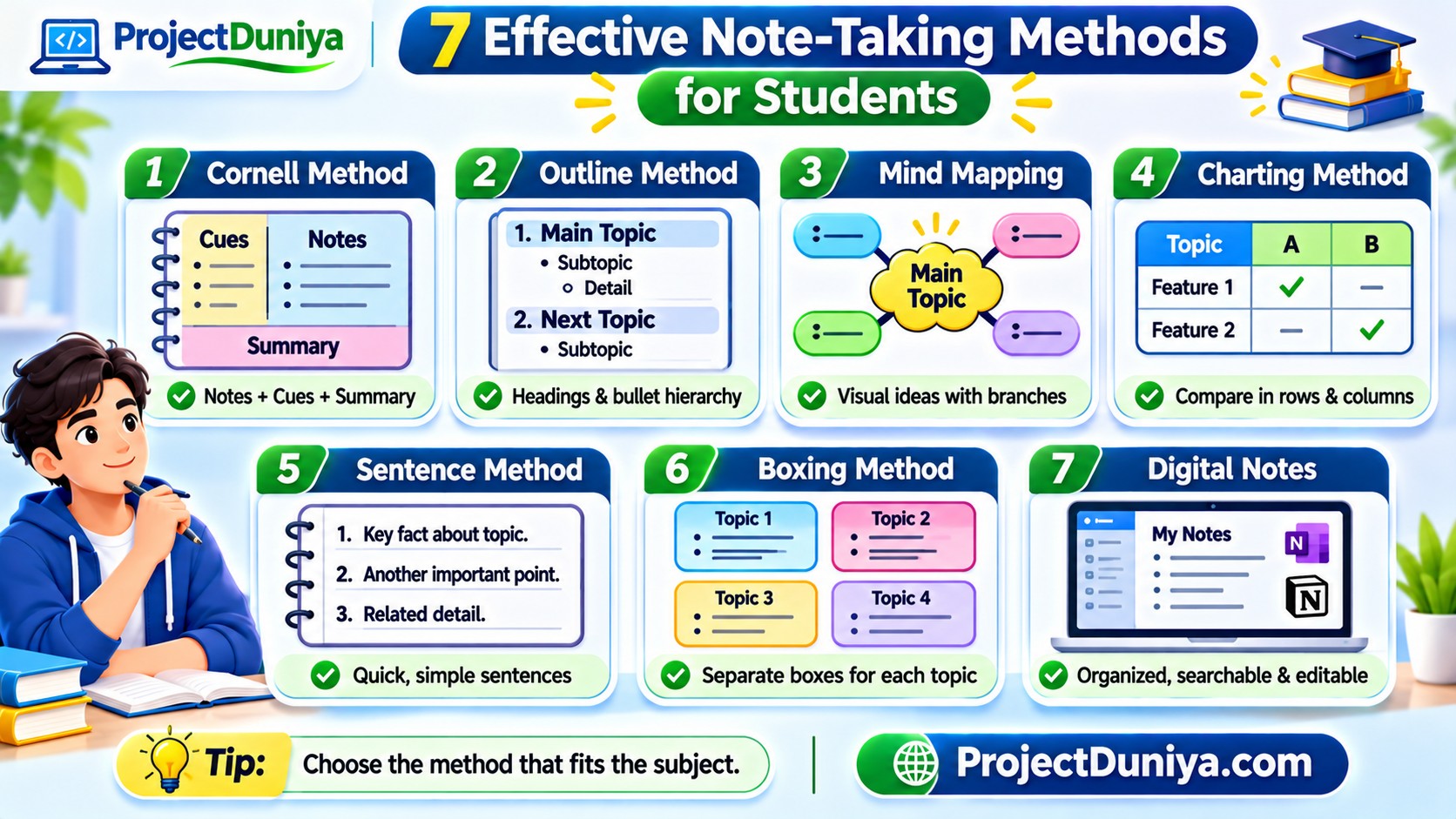
1. Cornell Note-Taking Method
The Cornell method is a structured technique that divides a page into three main sections: notes, cues, and summary. It is useful for recording lectures and reviewing important information later.
To use this method, divide your page into the following sections:
- Notes section: Write important explanations, examples, definitions, and details during the lecture.
- Cue section: Add keywords, questions, and important concepts that help you remember the topic.
- Summary section: Write a short summary of the lesson in your own words after class.
Best for: College lectures, theory subjects, examination preparation, and textbook reading.
2. Outline Note-Taking Method
The outline method organizes information using headings, subheadings, numbers, and bullet points. It is especially useful when a teacher explains a topic in a clear sequence.
Start with the main topic and place supporting information underneath it. Use indentation to show which ideas belong to each section.
- 1. Introduction
- Meaning of computer networks
- Uses of networking
- 2. Types of Networks
- LAN
- MAN
- WAN
- 3. Network Devices
- Router
- Switch
- Modem
This structure makes it easier to identify the main ideas and their supporting details. You can also turn the headings into revision questions before an examination.
Best for: Structured lectures, textbook chapters, programming theory, and subjects with multiple topics and subtopics.
3. Mind Mapping Method
Mind mapping is a visual note-taking technique that connects ideas through branches. Instead of writing information in a traditional list, you place the main topic in the center and connect related concepts around it.
Follow these steps to create a mind map:
- Write the main topic in the center of a blank page.
- Draw branches for the major concepts.
- Add smaller branches for definitions, examples, and supporting details.
- Use short keywords instead of long paragraphs.
- Use colors or simple symbols to distinguish related ideas.
Mind maps are particularly useful when several concepts are connected. They can also help students brainstorm ideas before writing an assignment or preparing a presentation.
Best for: Visual organization, brainstorming, project planning, and understanding connected concepts.
4. Charting Note-Taking Method
The charting method organizes information in rows and columns. It is useful when you need to compare multiple concepts using the same features.
For example, if you are studying programming languages, you can compare them by their purpose, difficulty, and common applications.
| Language | Common Use | Beginner Suitability |
|---|---|---|
| Python | Automation, data analysis, AI | Generally beginner-friendly |
| Java | Enterprise and application development | Requires learning object-oriented concepts |
| JavaScript | Web development | Useful for interactive web projects |
| C | Systems programming and fundamentals | Requires attention to memory and syntax |
This method helps you identify similarities and differences without reading separate paragraphs for every topic.
Best for: Comparisons, technical subjects, research, historical events, and exam revision.
5. Sentence Note-Taking Method
The sentence method involves writing each important point as a separate sentence or numbered item. It is a straightforward approach for lectures where the teacher shares many facts or moves quickly between ideas.
For example, while studying operating systems, your notes might look like this:
- An operating system manages computer hardware and software resources.
- It provides an interface between users and computer hardware.
- Memory management controls how programs use system memory.
- Process management handles the execution of running programs.
- File management organizes data stored on storage devices.
The main advantage is that you can record separate facts quickly. However, a long list of sentences can become difficult to revise if you do not organize it afterward.
Best for: Fast lectures, fact-heavy subjects, short explanations, and introductory lessons.
6. Boxing Note-Taking Method
The boxing method divides notes into separate visual boxes. Each box represents one topic, subtopic, or group of related information.
For example, when studying database concepts, you can create individual boxes for:
- Database fundamentals
- Types of database models
- SQL commands
- Primary and foreign keys
- Database normalization
Inside each box, include short definitions, important points, and examples. You can use a digital note-taking application or draw the boxes on paper.
This approach is useful when you want to create compact revision sheets. It may be less convenient during a fast lecture because organizing information into boxes takes additional time.
Best for: Topic summaries, revision sheets, visual organization, and digital notes.
7. Digital Note-Taking Method
Digital note-taking involves using applications on a computer, tablet, or smartphone to create and organize study materials. It allows you to search, edit, categorize, and access notes across supported devices.
Some popular tools include:
- Microsoft OneNote: Useful for organizing notebooks, sections, and pages by subject.
- Google Keep: Suitable for quick notes, reminders, and short study points.
- Notion: Useful for organizing notes, tasks, databases, and project information.
- Goodnotes: Helpful for handwritten digital notes and annotating documents on supported devices.
- Evernote: Offers notebooks, tags, and searchable notes for organizing information.
Choose an application based on your device, study requirements, budget, and available features. You do not need to use several applications at the same time. One well-organized tool is often enough to get started.
Best for: Students who want searchable notes, organized subject folders, digital documents, and easy editing.
8. Comparison of the Seven Note-Taking Methods
Use this table to decide which method may suit your study requirements.
| Method | Main Advantage | Best Situation |
|---|---|---|
| Cornell | Combines notes with review questions and summaries | Lectures and exam preparation |
| Outline | Organizes information hierarchically | Structured topics |
| Mind Mapping | Shows connections between ideas | Brainstorming and complex concepts |
| Charting | Makes comparisons easier | Comparative subjects |
| Sentence | Captures individual facts quickly | Fast lectures |
| Boxing | Separates information into visual groups | Topic summaries |
| Digital Notes | Supports searching and editing | Organizing study materials |
9. How to Choose the Right Note-Taking Method
You do not need to use the same method for every subject. Choose a technique based on the type of information you are studying and how you plan to use your notes.
- For theory subjects: Try Cornell notes or the outline method.
- For programming: Use headings, code examples, and short explanations. Keep important code separate from theory.
- For mathematics: Record formulas, worked examples, and step-by-step solutions.
- For comparisons: Use the charting method to organize differences and similarities.
- For project planning: Try mind maps or digital notes to connect ideas and track tasks.
- For quick lectures: Use the sentence method and organize the notes afterward.
Experiment with different techniques and keep the ones that make your notes easier to understand and revise.
10. Common Note-Taking Mistakes Students Should Avoid
Even a good note-taking method may not help if you use it incorrectly. Avoid these common mistakes:
- Writing everything word for word: Focus on main ideas and important details instead of copying every sentence.
- Not reviewing notes: Revisit your notes after class and clarify confusing points.
- Using too many colors: Keep formatting simple so important information remains easy to identify.
- Ignoring examples: Add practical examples to understand how a concept works.
- Keeping notes disorganized: Use clear subject names, headings, dates, and folders.
- Copying without understanding: Rewrite important concepts in your own words.
11. Build a Simple Daily Note-Taking Routine
A consistent routine can make your notes more useful over time. You can follow this simple process:
- Before class: Check the topic and review the previous lesson.
- During class: Record main ideas, definitions, examples, and questions.
- After class: Correct unclear points and organize the information.
- During revision: Use questions, summaries, and examples to test your understanding.
- Before examinations: Review the organized notes and focus on topics that need more practice.
Conclusion
Effective note-taking is not about writing the maximum amount of information. It is about organizing important ideas so that you can understand and remember them later.
The Cornell method is useful for structured lecture notes, mind mapping helps connect ideas, charting makes comparisons easier, and digital tools help organize study materials. You can also combine different methods depending on your subject.
Start with one technique, practice it consistently, and adjust your system as your academic needs change. For more student learning resources, project guidance, and academic support, visit ProjectDuniya.