
Introduction
E-commerce websites allow customers to browse and purchase products online. However, when an online store contains hundreds or thousands of products, customers may find it difficult to discover items that match their interests.
A product recommendation system helps solve this problem by suggesting products based on product information, customer preferences, browsing activity, and purchase history. For example, a customer interested in laptops may also receive recommendations for laptop bags, keyboards, and wireless mice.
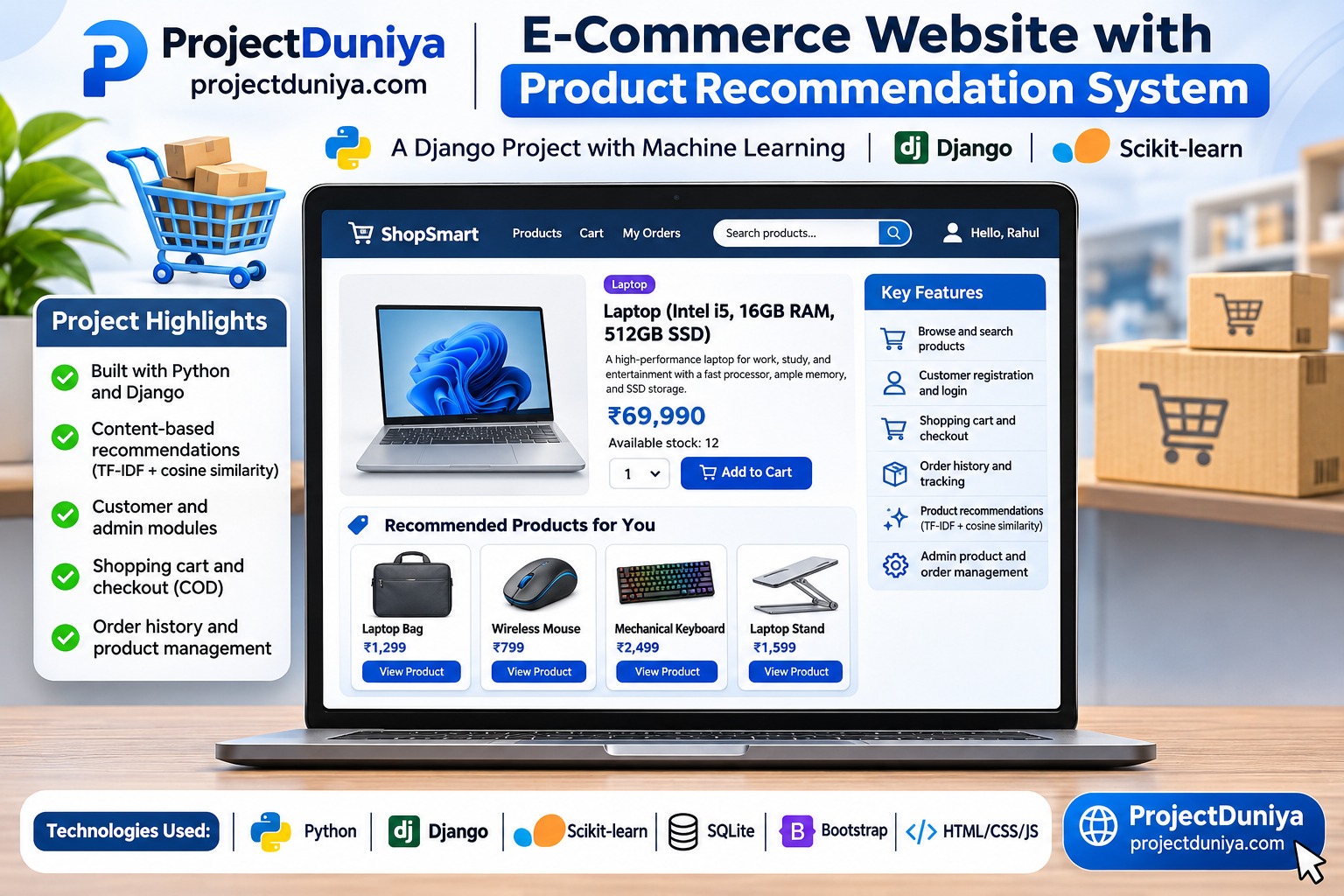
In this project, you will build an E-Commerce Website with a Product Recommendation System using Python and Django. The application will include customer registration, product categories, product search, a shopping cart, checkout, order history, and a machine learning recommendation engine.
The first version will use content-based filtering. It will compare product names, categories, and descriptions to find similar products. This approach is suitable for a student project because it can generate recommendations without requiring a large history of customer purchases.
1. Project Overview
| Component | Description |
|---|---|
| Project title | E-Commerce Website with Product Recommendation System |
| Programming language | Python |
| Backend framework | Django |
| Frontend | HTML, CSS, Bootstrap, JavaScript |
| Database | SQLite for local development |
| Machine learning | Scikit-learn |
| Recommendation algorithm | TF-IDF and cosine similarity |
| User roles | Customer and administrator |
| Checkout demonstration | Cash on delivery |
2. Main Features
Customer features
- Register, log in, and log out.
- Browse products by category.
- Search products by name and description.
- View product descriptions, prices, and stock availability.
- Add products to a shopping cart.
- Update product quantities and remove cart items.
- Place orders through checkout.
- View previous orders and order details.
- Receive recommendations for similar products.
Administrator features
- Access the Django administration panel.
- Add, update, and deactivate products.
- Create and manage product categories.
- Upload product images.
- Update product prices and stock quantities.
- View customer orders.
- Update order statuses.
- Monitor product and order records.
Recommendation features
- Compare products using their text descriptions.
- Identify products with similar categories and attributes.
- Rank products according to similarity scores.
- Display recommendations on product detail pages.
- Show popular products when personalized recommendations are unavailable.
3. How the System Works
The application follows a simple e-commerce workflow:
- The administrator adds products and categories.
- A customer registers or logs in.
- The customer browses products or searches for an item.
- The recommendation engine finds similar products.
- The customer adds products to the shopping cart.
- The customer reviews the cart and proceeds to checkout.
- The server validates the product stock and creates the order.
- The customer views the order confirmation and order history.
4. Understanding the Recommendation Algorithms
Content-based filtering
Content-based filtering recommends products that share characteristics with a product the customer is viewing or has previously interacted with.
For example, if a customer views a wireless keyboard, the system can compare its description with other products and recommend keyboards, computer accessories, or related products.
Collaborative filtering
Collaborative filtering uses customer interactions to identify patterns between users and products. It can recommend products based on what similar customers viewed, liked, added to their carts, or purchased.
Hybrid recommendation
A hybrid recommendation system combines content-based filtering and collaborative filtering. It can use product descriptions when interaction data is limited and customer behaviour when sufficient data is available.
| Method | Required data | Use in this project |
|---|---|---|
| Content-based | Product names, categories, descriptions | Implemented in the main tutorial |
| Collaborative | Customer-product interactions | Optional advanced extension |
| Hybrid | Product attributes and interactions | Future enhancement |
5. Technologies Required
- Python: Backend programming and recommendation logic.
- Django: Application routing, authentication, database models, and views.
- SQLite: Local database for development.
- Scikit-learn: TF-IDF vectorization and cosine similarity.
- Pillow: Image handling for product uploads.
- HTML and CSS: Frontend structure and styling.
- Bootstrap: Responsive layout and product cards.
- JavaScript: Optional interactive interface elements.
6. Install the Required Software
Install Python and create a project directory.
Create a virtual environment:
python -m venv venvActivate it on Windows:
venv\Scripts\activateOn macOS or Linux:
source venv/bin/activateInstall the required packages:
pip install django scikit-learn pillowCheck the Django installation:
python -m django --version7. Create the Django Project
Create a Django project named ecommerce:
django-admin startproject ecommerce
cd ecommerce
Create an application named shop:
python manage.py startapp shopOpen ecommerce/settings.py and add the application:
INSTALLED_APPS = [
    "django.contrib.admin",
    "django.contrib.auth",
    "django.contrib.contenttypes",
    "django.contrib.sessions",
    "django.contrib.messages",
    "django.contrib.staticfiles",
    "shop",
]
Configure the templates, media files, and authentication redirects. Add the following settings:
TEMPLATES[0]["DIRS"] = [
    BASE_DIR / "templates"
]

MEDIA_URL = "/media/"
MEDIA_ROOT = BASE_DIR / "media"

LOGIN_URL = "login"
LOGIN_REDIRECT_URL = "product_list"
LOGOUT_REDIRECT_URL = "product_list"
The default SQLite database configuration is sufficient for this local development version.
8. Recommended Project Structure
Organize the project as follows:
ecommerce/
│
├── manage.py
│
├── ecommerce/
│   ├── settings.py
│   ├── urls.py
│   ├── asgi.py
│   └── wsgi.py
│
├── shop/
│   ├── migrations/
│   ├── models.py
│   ├── admin.py
│   ├── forms.py
│   ├── views.py
│   ├── urls.py
│   ├── cart.py
│   ├── recommender.py
│   └── tests.py
│
├── templates/
│   ├── base.html
│   ├── registration/
│   │   ├── login.html
│   │   └── register.html
│   └── shop/
│       ├── product_list.html
│       ├── product_detail.html
│       ├── cart.html
│       ├── checkout.html
│       ├── order_success.html
│       ├── order_history.html
│       └── order_detail.html
│
└── media/
    └── products/
9. Create the Database Models
The database stores categories, products, customer orders, order items, and product interactions.
Open shop/models.py and add:
from django.db import models
from django.contrib.auth.models import User


class Category(models.Model):
    name = models.CharField(max_length=100)
    slug = models.SlugField(unique=True)

    class Meta:
        ordering = ["name"]

    def __str__(self):
        return self.name


class Product(models.Model):
    category = models.ForeignKey(
        Category,
        on_delete=models.PROTECT,
        related_name="products"
    )

    name = models.CharField(max_length=200)
    description = models.TextField()

    price = models.DecimalField(
        max_digits=10,
        decimal_places=2
    )

    stock = models.PositiveIntegerField(default=0)

    image = models.ImageField(
        upload_to="products/",
        blank=True,
        null=True
    )

    is_active = models.BooleanField(default=True)

    created_at = models.DateTimeField(
        auto_now_add=True
    )

    class Meta:
        ordering = ["-created_at"]

    def __str__(self):
        return self.name


class Order(models.Model):
    STATUS_CHOICES = [
        ("PENDING", "Pending"),
        ("CONFIRMED", "Confirmed"),
        ("SHIPPED", "Shipped"),
        ("DELIVERED", "Delivered"),
        ("CANCELLED", "Cancelled"),
    ]

    customer = models.ForeignKey(
        User,
        on_delete=models.PROTECT,
        related_name="orders"
    )

    full_name = models.CharField(max_length=150)
    email = models.EmailField()
    phone = models.CharField(max_length=20)
    address = models.TextField()
    city = models.CharField(max_length=100)
    postal_code = models.CharField(max_length=20)

    status = models.CharField(
        max_length=20,
        choices=STATUS_CHOICES,
        default="PENDING"
    )

    total_amount = models.DecimalField(
        max_digits=12,
        decimal_places=2,
        default=0
    )

    payment_method = models.CharField(
        max_length=30,
        default="COD"
    )

    created_at = models.DateTimeField(
        auto_now_add=True
    )

    class Meta:
        ordering = ["-created_at"]

    def __str__(self):
        return f"Order #{self.id}"


class OrderItem(models.Model):
    order = models.ForeignKey(
        Order,
        on_delete=models.CASCADE,
        related_name="items"
    )

    product = models.ForeignKey(
        Product,
        on_delete=models.PROTECT
    )

    product_name = models.CharField(max_length=200)

    quantity = models.PositiveIntegerField()

    unit_price = models.DecimalField(
        max_digits=10,
        decimal_places=2
    )

    def subtotal(self):
        return self.unit_price * self.quantity

    def __str__(self):
        return self.product_name


class ProductInteraction(models.Model):
    EVENT_CHOICES = [
        ("VIEW", "View"),
        ("CART", "Add to cart"),
        ("PURCHASE", "Purchase"),
        ("LIKE", "Like"),
    ]

    user = models.ForeignKey(
        User,
        on_delete=models.CASCADE
    )

    product = models.ForeignKey(
        Product,
        on_delete=models.CASCADE
    )

    event_type = models.CharField(
        max_length=20,
        choices=EVENT_CHOICES
    )

    created_at = models.DateTimeField(
        auto_now_add=True
    )

    class Meta:
        ordering = ["-created_at"]

    def __str__(self):
        return (
            f"{self.user.username} - "
            f"{self.product.name} - "
            f"{self.event_type}"
        )
The OrderItem model stores the product name and unit price at the time of purchase. This preserves historical order information even if the administrator changes the product name or price later.
The ProductInteraction model is included for future personalization. The initial recommendation engine works without requiring interaction history.
10. Register Models in Django Admin
Open shop/admin.py:
from django.contrib import admin
from .models import (
    Category,
    Product,
    Order,
    OrderItem,
    ProductInteraction
)


class ProductAdmin(admin.ModelAdmin):
    list_display = (
        "name",
        "category",
        "price",
        "stock",
        "is_active"
    )

    list_filter = (
        "category",
        "is_active"
    )

    search_fields = (
        "name",
        "description"
    )


class OrderItemInline(admin.TabularInline):
    model = OrderItem
    extra = 0
    readonly_fields = (
        "product",
        "product_name",
        "quantity",
        "unit_price"
    )


class OrderAdmin(admin.ModelAdmin):
    list_display = (
        "id",
        "customer",
        "total_amount",
        "status",
        "created_at"
    )

    list_filter = ("status",)
    search_fields = (
        "full_name",
        "email"
    )

    inlines = [OrderItemInline]


admin.site.register(Category)
admin.site.register(Product, ProductAdmin)
admin.site.register(Order, OrderAdmin)
admin.site.register(ProductInteraction)
Create the database tables:
python manage.py makemigrations
python manage.py migrate
Create an administrator account:
python manage.py createsuperuserStart the development server:
python manage.py runserverOpen http://127.0.0.1:8000/admin/ and log in. Add product categories and products through the administration panel.
11. Create the Customer Registration Form
Django includes a built-in user authentication system. Use its user creation form so passwords are validated and stored using Django’s password hashing mechanisms.
Create shop/forms.py:
from django import forms
from django.contrib.auth.forms import UserCreationForm
from django.contrib.auth.models import User


class RegistrationForm(UserCreationForm):

    email = forms.EmailField(required=True)

    class Meta:
        model = User
        fields = [
            "username",
            "email",
            "password1",
            "password2"
        ]


class CheckoutForm(forms.Form):

    full_name = forms.CharField(max_length=150)

    email = forms.EmailField()

    phone = forms.CharField(max_length=20)

    address = forms.CharField(
        widget=forms.Textarea
    )

    city = forms.CharField(max_length=100)

    postal_code = forms.CharField(max_length=20)
12. Implement the Shopping Cart
A shopping cart stores the products a customer intends to purchase. For this student project, use Django sessions to maintain cart information between page requests.
Create shop/cart.py:
from decimal import Decimal
from .models import Product


class Cart:

    SESSION_KEY = "shopping_cart"

    def __init__(self, request):

        self.session = request.session

        cart = self.session.get(
            self.SESSION_KEY
        )

        if cart is None:
            cart = {}
            self.session[self.SESSION_KEY] = cart

        self.cart = cart

    def add(self, product, quantity=1):

        product_id = str(product.id)

        current_quantity = int(
            self.cart.get(product_id, 0)
        )

        new_quantity = current_quantity + quantity

        if quantity < 1:
            raise ValueError(
                "Quantity must be greater than zero."
            )

        if new_quantity > product.stock:
            raise ValueError(
                "Requested quantity exceeds available stock."
            )

        self.cart[product_id] = new_quantity

        self.session.modified = True

    def update(self, product, quantity):

        product_id = str(product.id)

        if quantity < 1:
            self.remove(product_id)
            return

        if quantity > product.stock:
            raise ValueError(
                "Requested quantity exceeds available stock."
            )

        self.cart[product_id] = quantity

        self.session.modified = True

    def remove(self, product_id):

        self.cart.pop(str(product_id), None)

        self.session.modified = True

    def clear(self):

        self.session.pop(self.SESSION_KEY, None)

        self.cart = {}

        self.session.modified = True

    def items(self):

        product_ids = [
            int(product_id)
            for product_id in self.cart.keys()
        ]

        products = Product.objects.filter(
            id__in=product_ids,
            is_active=True
        )

        for product in products:

            quantity = int(
                self.cart.get(str(product.id), 0)
            )

            yield {
                "product": product,
                "quantity": quantity,
                "subtotal": (
                    product.price * quantity
                )
            }

    def total(self):

        return sum(
            (
                item["subtotal"]
                for item in self.items()
            ),
            Decimal("0.00")
        )

    def count(self):

        return sum(
            int(quantity)
            for quantity in self.cart.values()
        )
This cart stores product IDs and quantities in the session. Prices are retrieved from the database rather than trusted from the browser. Stock is checked again during checkout because inventory may change after an item is added to the cart.
13. Build the Product Recommendation Engine
Create shop/recommender.py. The recommendation engine will compare product names, categories, and descriptions.
from sklearn.feature_extraction.text import TfidfVectorizer
from sklearn.metrics.pairwise import cosine_similarity

from .models import Product


def get_recommendations(product_id, limit=5):

    products = list(